
Sometimes an AI-generated character is just a pretty picture: one angle, one emotion, one outfit—and that’s it. But a screenplay, comic, game or animation needs more.
A true production approach means building a complete design document for the character, with multiple views, facial expressions, clothing, materials, psychology and guidance for artists, animators or the director.
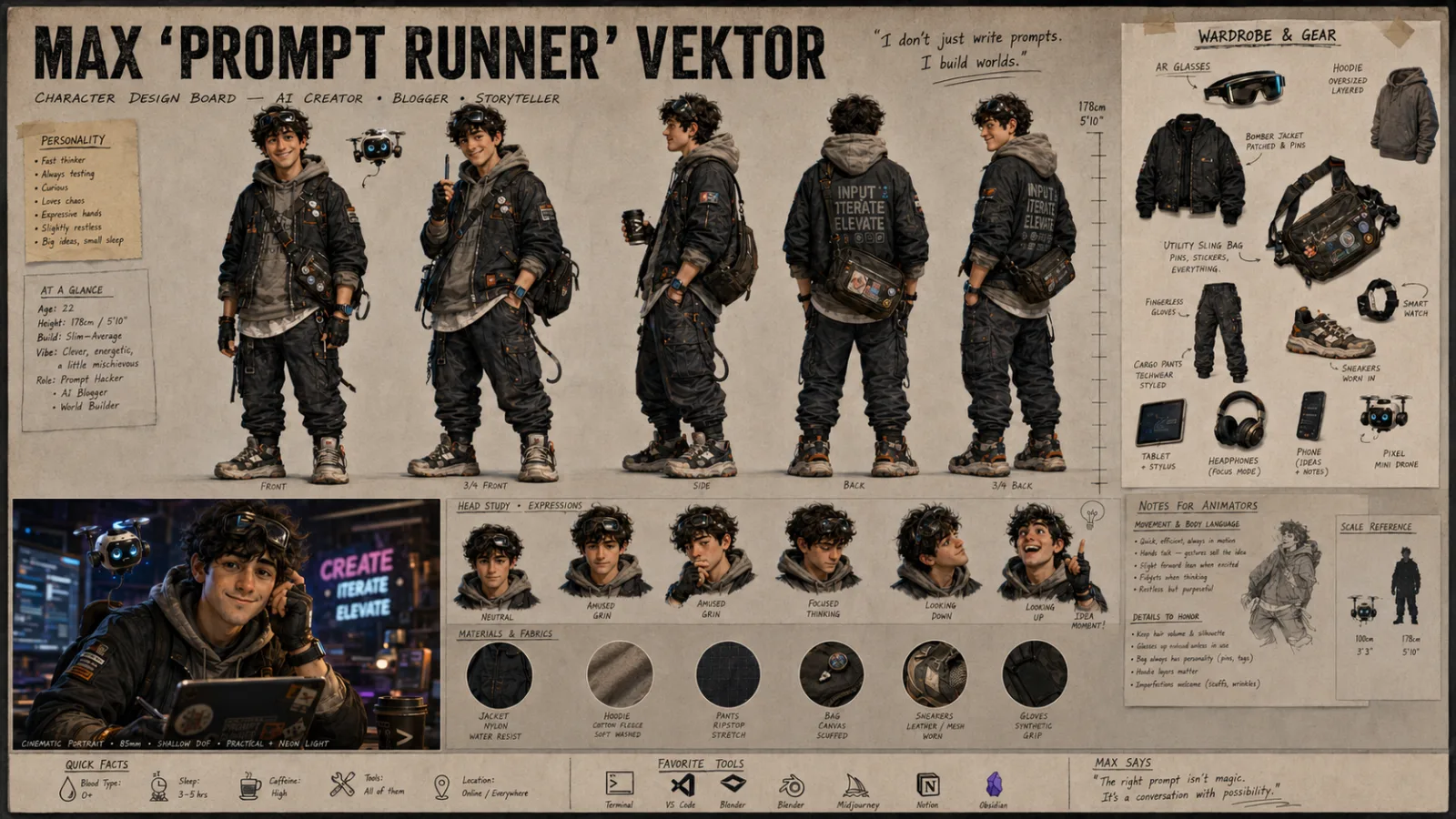
I tested a prompt format that turns a simple character description into a complete character design sheet —a visual character board resembling materials for an animation studio or pitch deck.
What you’ll get
The result is more than a character portrait. It’s a complete design board:
— multiple character views: front, three-quarter, side and back;
— a dedicated section for emotions and facial expressions;
— a cinematic portrait with depth of field;
— a breakdown of clothing, fabrics, accessories and details;
— notes on personality and behavior;
— body proportions and a height scale;
— annotations for animators, artists and costume designers.
This format is especially useful if you’re developing a character for a story, game, comic, video, presentation or visual concept.
Where you can use it
This prompt is well suited to:
— screenwriters who need a visual representation of a character;
— comic and manga creators;
— indie game developers;
— DnD/RPG character creators;
— animation pitch decks;
— brands developing a mascot;
— AI artists who need a fully developed character rather than a single piece of art.
The main idea: first, fill in the character profile, then send it to GPT Image 2 to get an almost finished production reference rather than a random piece of art.
Fill in the character details before generating
For a stronger result, start by describing your character using this structure:
Character name:
Age:
Height:
Body type:
Style / visual direction:
Cultural or genre references:
Face shape:
Skin / texture:
Eyes:
Hair:
Distinctive features:
Personality:
Internal conflict:
Habits:
Emotional baseline:
Movement style:
Main outfit:
Footwear:
Accessories:
Items the character often carries:
Location for the cinematic portrait:
Color palette:
Project genre:
Ready-to-use prompt for GPT Image 2
Create a cinematic, film-production-grade character design board for a fictional character.

The result should look like a high-budget animated film pre-production board, not a generic character sheet. Make it feel intentional, art-directed, and ready for use by a director, concept artist, costume designer, animator, and pitch deck team.

CORE RULES:
No generic layout.
No empty symmetrical grid.
No random collage.
No AI-looking chaos.
Every section must feel deliberately placed.
Keep the same face, body proportions, costume, materials, and personality across all views.
Do not redesign the character between angles.

CHARACTER IDENTITY:
Name: [character name]
Alias / Codename: [nickname, symbolic title, or ID]
Age: [real or stylized age]
Height: [exact height in cm or ft]
Body type: [detailed body structure, proportions, weight distribution, posture]
Ethnicity / visual influence: [real-world influence, stylized hybrid, cultural grounding, genre reference]
Overall style: [Pixar-like, cinematic semi-realism, anime-inspired, dark fantasy, urban realism, etc.]

FACE DESIGN:
Face structure: [face shape, bone structure, exaggeration level, asymmetry]
Skin / surface: [texture, softness, imperfections, pores, stylization level]
Eyes: [size, spacing, color, expression, emotional quality]
Hair: [style, texture, volume, movement, imperfections]
Distinct features: [scars, dimples, freckles, stretch, unusual anatomy, accessories, etc.]

PSYCHOLOGICAL PROFILE:
Core traits: [3–5 dominant personality traits]
Internal conflict: [what the character wants vs what holds them back]
Behavior patterns:
1. [habit or behavioral detail]
2. [habit or behavioral detail]
3. [habit or behavioral detail]
Emotional baseline: [default emotional state and how quickly it shifts]

PERFORMANCE DIRECTION:
The character should feel like a real actor caught mid-moment, not a static pose.
Show micro-expressions: lip tension, eyebrow movement, eye focus, small facial asymmetry.
Avoid staged symmetry.
Capture the emotional transition before or after a reaction.

Body language:
Posture: [posture tendencies]
Movement rhythm: [stiff, bouncy, heavy, sharp, dragging, nervous, relaxed, etc.]
Idle behavior: [fidgeting, stillness, tension, hand habits, facial habits]

WARDROBE:
Primary outfit:
Garment 1: [fabric type, cut, wear, imperfections]
Garment 2: [fit, distortion, stitching, layering]
Garment 3: [optional detail]
Footwear: [material, wear pattern, realism vs stylization]
Accessories: [functional or personality-revealing objects]
Props: [objects often carried by the character]

MATERIAL AND TEXTURE:
Fabrics must show believable stretch, wrinkles, seams, stitching, folds, dirt, and age.
Surfaces should not look plastic unless intentionally stylized.
Skin should have soft light interaction, subtle bounce, and natural imperfections.
Add usage marks: dust, smudges, worn edges, scratches, faded fabric, or fingerprints where appropriate.

TURNAROUND REQUIREMENTS:
Create a full-body turnaround with consistent proportions and design:
1. Front view
2. 3/4 front view
3. Side view
4. Back view
5. 3/4 back view

All views must preserve the same face, body shape, outfit, accessories, color palette, and material logic.

HEAD STUDY:
Include expressive head variations:
1. Front — neutral or controlled expression
2. 3/4 — main personality expression
3. Profile — clear structure and silhouette
4. Looking down — emotion: [insert emotion]
5. Looking up — emotion: [insert emotion]
6. Dynamic angle — intense emotional state: [insert emotion]

Expressions must feel captured mid-thought, not posed.

CINEMATIC PORTRAIT:
Add one cinematic portrait frame of the character in a believable environment.
Environment: [specific location connected to the character]
Lighting: [motivated light source, ambient glow, contrast level]
Color tone: [warm, cool, mixed, stylized, muted, neon, dusty, etc.]
Expression: [specific narrative moment]
Camera: realistic film lens, 50mm or 85mm, shallow depth of field, cinematic realism.

CAMERA AND LIGHTING:
Full body views: clean production lighting, neutral background, readable silhouette.
Portrait: 85mm lens look, shallow depth of field, focus on eyes and expression.
Use soft key light, bounce light, natural exposure, no harsh HDR effect.
Keep the lighting cinematic but clear enough for production reference.

BOARD COMPOSITION:
Use a clean but art-directed layout.
Neutral background: warm gray, paper texture, or soft studio tone.
Arrange sections dynamically but keep them readable.
Include:
- height scale reference
- fabric and material callouts
- wardrobe breakdown
- personality notes
- prop close-ups
- animator notes
- small handwritten-style annotations

STYLE DIRECTION:
The design should feel like a premium studio presentation board.
Reference quality: animated feature film concept art, pre-production design sheet, cinematic character bible.
The character should feel appealing, emotionally readable, and production-ready.

OUTPUT QUALITY:
Extremely high detail.
Sharp focus.
Professional pre-production fidelity.
Suitable for film development, game concept art, merchandising, animation references, and pitch decks.
How to use this prompt
It’s best to fill in the prompt before submitting it. Start with the key fields: name, age, personality, clothing, emotions, environment and style. The more specific your character description, the less randomness you’ll get in the result.
For example, instead of:
Main outfit: hoodie and jeanstry writing:
Main outfit: oversized dark-gray hoodie with stretched cuffs, faded print, small stains, layered over a washed black T-shirt; loose worn jeans with knee creases and dusty sneakers.AI works well when you describe not just an object, but its material, condition, history and visual purpose.
A quick tip from AIFeed
The strongest part of this prompt isn’t the wording “cinematic” or “high detail,” but the requirement to keep the same character consistent across all views.
That’s what turns a generated image into a practical design document. You can use this board as a foundation for developing a screenplay, comic, game, animation or visual presentation.